
Campus Resources and Supports for Faculty and Staff
WCU remains committed to fostering an inclusive and supportive environment and will continue to provide updates and address concerns with clarity and accuracy. This document is designed to provide a single location with the resources and information available to you.
Faculty/Staff Compliance with Law Enforcement
- Compliance with all law enforcement is required and is the official position of the University as an instrumentality of the Commonwealth.
- Contact WCU’s Public Safety Office (610-436-3311) if you come into contact with non-WCU law enforcement on campus. For those faculty and staff at locations other than WCU’s main campus, please contact 911 and thereafter contact WCU’s Public Safety.
- Remain calm and demonstrate the professionalism and excellence that define WCU.
- Law enforcement has the right to come to campus and be present in the public areas of campus. Public areas are those that are unlocked during business hours and are open to the general public, including but not limited to the library, lobbies, parking lots, grassy areas, and sidewalks.
- Faculty and staff do not have authorization to provide law enforcement access to nonpublic areas of campus, such as classrooms, offices, and residence halls. Only the administration can authorize such access. If an individual (faculty, staff, or student) inadvertently allows a law enforcement officer access to any area of campus, it can be hard to undo any issues that arise.
- Do not share student information directly with law enforcement – refer them to Christine Siegl in Academic Contract Administration and Compliance Operations, or the President’s office.
- For off-campus incidents, follow local law enforcement protocols and report incidents to WCU administration.
Responding to Legal Requests on Campus
- Key Takeaways:
- We are here to support you. Do not respond to legal requests on your own.
- Compliance with law enforcement is required and is the official position of the University as an instrumentality of the Commonwealth.
- Remain calm and demonstrate the professionalism and excellence that define WCU.
- Always direct law enforcement to Public Safety. For those faculty and staff at locations other than WCU’s main campus, please contact 911 and thereafter contact WCU’s Public Safety.
- Subpoenas for student, employee or WCU records:
- Direct process servers or forward any received paperwork to Christine Siegl in Academic Contract Administration and Compliance Operations. Her office will coordinate with University Legal Counsel.
- Subpoenas must immediately be scanned and emailed to Christine Siegl, and no employee outside of the Academic Contract Administration and Compliance Operations or the President’s office should respond independently.
- Search Warrants: Law enforcement must be directed to Public Safety.
- Public Safety consults with the Chester County District Attorney’s Office, University Legal Counsel, and the President’s office as needed.
- Alert Public Safety, the President’s office, and your direct supervisor.
- You may tell the individuals executing a warrant that you have been advised to contact the administration and Public Safety so that they can verify the validity of the warrant.
- Arrest Warrants: Require immediate compliance.
- Faculty/staff should direct law enforcement to Public Safety.
- Alert Public Safety, the President’s office, and your direct supervisor.
Campus Safety Protocols
- If students or employees have safety concerns, they should contact Public Safety (or
911 for those who are not on WCU’s main campus).
- Public Safety is the primary point of contact. Should a report to Public Safety suggest stalking, threats, or violence due to gender, race, ethnicity, national origin, etc., Public Safety officers will submit a report to the Office of Equal Opportunity and Compliance (EOC).
- Public Safety regularly works with local, state and federal agencies.
- Public Safety officers do not conduct citizenship checks.
- For faculty and staff working after hours, Public Safety provides robust around-the-clock protection for our campus community, using personnel and technology to ensure the safety of our community members.
- Faculty and staff with security concerns should contact Public Safety and alert their direct supervisors.
Contacting Public Safety in an Emergency
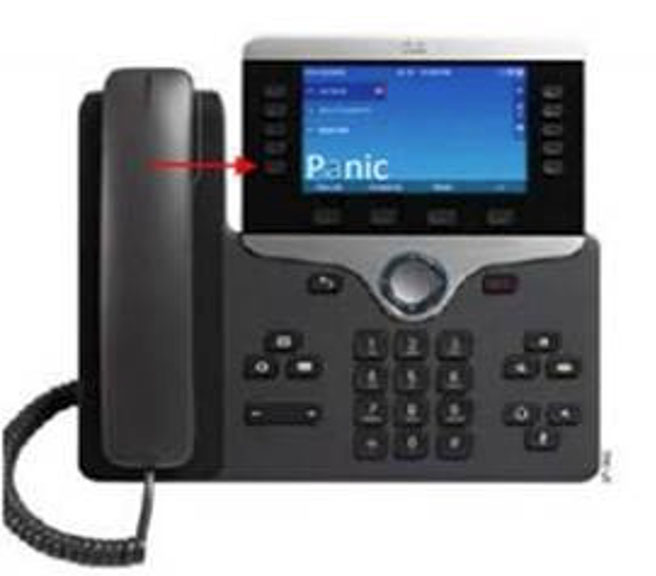
- Panic Button on every desk phone: As of January 18, 2021, every desk phone has a Panic Button key that when pressed will send a silent alert to Public Safety.
- Where is the Panic Button located: You will find the panic button key on the bottom left button of your phone display.
- What happens when I press the Panic Button on my phone?: Pressing the button will alert Public Safety of your location and Caller ID. This is a silent alert from your standpoint so as not to alert anyone else nearby. You will not hear a telephone ring or dial tone, nor will you hear Public Safety answer the call on the other end. It is designed this way for your safety. For questions or further information, please contact Public Safety at DPS-ESSUPPORT@wcupa.edu
- If I press the Panic Button, will Public Safety dispatch an officer to my location?: Yes, pressing the Panic Button will prompt immediate response from Public Safety. Care must be taken not to press the button accidentally. The button is strategically located to reduce the likelihood of an accidental alert.
WCU Safe
- WCU Safe is the official safety app of West Chester University. It is the only app that integrates with WCU's safety and security systems and is our recommended app for individuals in rooms without phones that provide the panic button.
- The Department of Public Safety has worked to develop a unique app that provides students,faculty and staff with added safety on the WCU campus. The app will send you important safety alerts and provide instant access to campus safety resources.
Features of WCU Safe
- Panic Button/Mobile Bluelight: Send your location to WCU Public Safety in real-time in case of a crisis.
- Emergency Contacts: Contact the correct services for the WCU area in case of an emergency or a non-emergency concern.
- Virtual WalkHome: Allow Public Safety to monitor a user’s walk. If a user feels unsafe when walking on campus, they can request a Virtual WalkHome and a dispatcher on the other end will monitor their journey until they reach their destination.
- Public Safety Escort: This walking escort service is provided to students, faculty, and staff from one on-campus location to another.
- Friend Walk: Send your location to a friend through email or SMS on your device. Once the friend accepts the Friend Walk request, the user picks their destination, and their friend tracks their location in real time;they can keep an eye on them to make sure they make it safely to their destination.
- Emergency Plans: Campus emergency documentation that can prepare you for disasters or emergencies. This can be accessed even when users aren’t connected to Wi-Fi or cellular data.
- Support Resources: Access support resources in one convenient app to enjoy a successful experience at WCU.
- Safety Notifications: Receive instant notifications and instructions from WCU Public Safety when on-campus emergencies occur.
Important Contact Information
- Public Safety: 610-436-3311
- President’s Office: 610-436-2471 and president@wcupa.edu
- Academic Contracts and Compliance: 610-436-2817
- Office of Equal Opportunity and Compliance: 610-436-2433 and eoc@wcupa.edu
- WCU Counseling Center: 610-436-2301